Cricut Picture Frame for Father’s Day


Tell Dad he “rocks” with this easy Cricut Picture Frame for Father’s Day.

My Cricut has been a game-changer. I love how quickly I can put together a gift or craft and this Cricut picture frame for Father’s Day is no exception.
Rock art has been popular in recent years, but for this project I wanted something a little more traditional. You can get bags of rocks at the dollar store or the craft store, but if you want to keep the kids busy for an hour send them outside to collect some.
What I love about this project is how inexpensive it is and how easily it can be put together – so it’s the perfect last-minute Father’s Day craft. If you’re ready to get started, read on.
Materials Needed
- Photo frame (grey or painted charcoal with chalky paint); 3” x 5” with wide wood frame or similar size
- Cricut Maker or Cricut Joy
- Standard grip mat
- Cricut Premium Vinyl, Removable (Light Gray from Vibrant Value Pack)
- Cricut’s Hostess with the Mostess Winter Sparkle Deluxe Paper, 1 sheet
- Cricut Transfer Tape
- Rock’n SVG cut file OR PDF file
- Small Pebbles
- Hot glue gun with clear craft glue
Preparing the Frame
- Disassemble the photo frame, removing the glass, which can be carefully discarded. If needed, paint the frame with 1-2 coats of relic (charcoal) chalky paint. Set aside to dry.
- Once dry, heat a hot glue gun with clear glue sticks.
- Starting in one corner of the picture frame, apply a dab of hot glue. Working quickly and carefully, press one small pebble into the glue.
- Continue covering the surface of the frame with pebbles until finished.

Uploading the SVG Pattern
Upload Rock’n SVG cut file into Design Space.


Cutting
- Select “Make It” in Design Space.
- For the vinyl phrases, set the material type to Premium Vinyl. Follow prompts for loading the mat into the Cricut Maker or Cricut Joy and cutting the Premium Vinyl. When prompted, unload the mat from the cutting machine.
- Remove the Premium Vinyl from the mat.
- For the paper photo frame backing, set the material type to cardstock, medium weight. Follow prompts for loading the mat into the Cricut Maker or Cricut Joy and cutting the Deluxe Paper. When prompted, unload the mat from the cutting machine.
- Remove the Deluxe Paper from the mat.

How to Assemble the Frame
- Place the glass from the photo frame on a flat surface.
- Cut around the vinyl cut phrase with a pair of scissors.
- Using the weeding tool, peel away the excess vinyl around the cut phrase and discard.
- Cut a piece of transfer tape a bit larger than the size of the phrase. Peel away the transfer tape backing and place the transfer tape overtop of the cut phrase. Gently rub the vinyl to help it stick to the transfer tape.
- Peel away the vinyl backing, leaving just the phrase adhered to the transfer tape.
- Position the phrase with the transfer tape on to the glass and press in place.
- Press the vinyl phrase down with your fingers or with the Cricut scraping tool to help it to stick to the glass surface.
- Slowly and carefully remove the transfer tape leaving the vinyl phrase on the glass. Place the glass back into the pebble picture frame.
- Place the blue cardstock paper mat into the frame against the glass. Reassemble the backing into the frame.
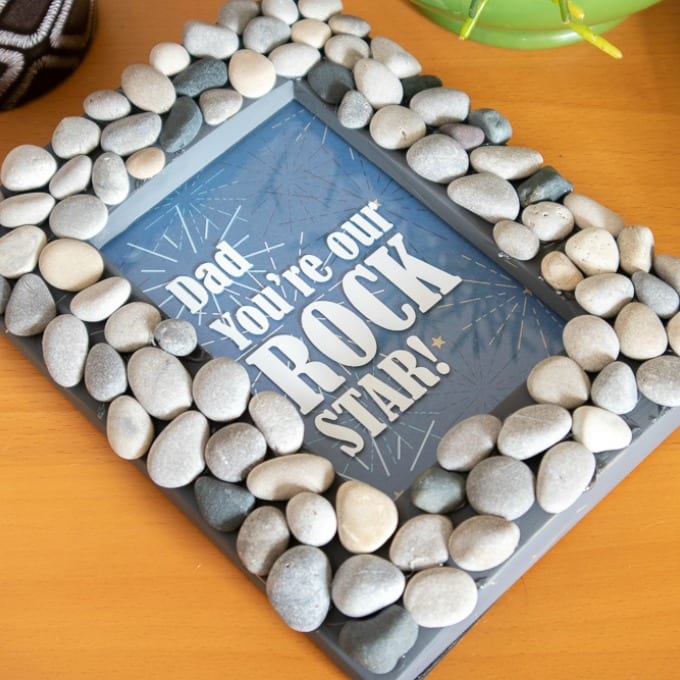
Isn’t this Cricut picture frame for Father’s day so cute? Dad will love it!
More Father’s Day Ideas
- Chocolate Covered Oreos for Dad
- Shrinky Dink Initial Key Chain Project
- DIY Wooden Photo Blocks
- Cowboy Steak Rub Recipe
- DIY Photo Phone Case